
 A budget shouldn't require you to become a part-time bookkeeper.
That's the problem with a lot of traditional budgeting advice. It starts with a reasonable goal: spend less than you earn, save for future costs, and make sure your money is going where you want it to go. Then it turns that goal into a private accounting department. Every purchase needs a category. Every category needs a limit. Every overage needs an adjustment. Every receipt becomes a tiny clerical task.
That can sound responsible in theory. In practice, it can become an unpaid job you gave yourself.
You may need a budget. You probably don't need a bookkeeping system.
A useful budget should answer a practical question: am I spending more than my income can safely support? It doesn't necessarily need to answer how much of your last Walmart receipt was groceries, household goods, school supplies, clothing, and miscellaneous.
A budget doesn't have to describe your entire life. It only has to tell you when to slow down.
The System in a Nutshell
The Cashflow Waterline system is a one-number budget. Instead of tracking dozens of spending categories, you choose a target balance for your main payment account. If the account stays at or above that balance after the month settles, the system worked. If it sinks below that balance, something needs attention.
The system has five basic parts:
- Automate retirement and long-term investing before money becomes ordinary spending money.
- Use one Payment Hub for normal spending.
- Set a Buffer Balance for that Payment Hub.
- Use a Smooth Sailing Fund for predictable lumpy costs.
- Use a Stormy Weather Fund for unpredictable lumpy costs.
At the end of the month, look at the Payment Hub. If it's at or above the Buffer Balance, the budget worked. If it's below the Buffer Balance, reimburse any lumpy costs first. If it's still below the line, find the cause (usually over-spending) and restore the buffer (usually by spending less).
The goal isn't to track every transaction forever. The goal is to create a simple signal: above the waterline, the system is working; below the waterline, something needs correction.
System Summary
 The Cashflow Waterline system starts before ordinary spending begins.
First, automate retirement and long-term investing. Money for a 401(k), 403(b), IRA, taxable brokerage account, or other long-term goal should leave before it becomes ordinary spending money. The more important the money is, the less it should depend on whatever happens to be left after daily life gets done with it.
Second, use one Payment Hub for normal spending. This might be a checking account, cash-management account, or brokerage cash account. The exact type of account matters less than the job it does. This is the account where ordinary bills, credit card autopay, and routine expenses clear.
Third, set a Buffer Balance for the Payment Hub. This is the waterline. If the account stays at or above this balance after the month settles, the budget worked. If it sinks below this balance, something needs attention.
Fourth, use a Smooth Sailing Fund for predictable lumpy costs. These are expenses like insurance, annual subscriptions, registrations, known renewals, and other scheduled non-monthly costs. You list them in a spreadsheet, divide the total by paycheck or by month, and fund them automatically.
Fifth, use a Stormy Weather Fund for unpredictable lumpy costs. These are repairs, deductibles, surprise expenses, and inconvenient financial hits. They're not exactly normal monthly spending, but they're also not shocking in the larger sense. Life does this. The fund exists so these expenses don't corrupt the signal from the Payment Hub.
The monthly rule is simple:
At the end of the month, look at the Payment Hub. If it's at or above the Buffer Balance, the system worked. If it's below the Buffer Balance, reimburse any lumpy costs first. If it's still below the line, find the cause and restore the buffer.
That's the budget.
Categorize spending by behavior, not by what you bought
Traditional budgeting usually categorizes spending by what the money bought: groceries, restaurants, gasoline, kid stuff, clothing, entertainment, insurance, subscriptions, and so on.
Cashflow Waterline categorizes spending by how the spending behaves.
There are three basic kinds of spending in this system.
The first kind is normal monthly spending. This is ordinary day-to-day life: food, gas, small household purchases, eating out, errands, kid stuff, and routine purchases. These expenses flow through the Payment Hub and are controlled by the Buffer Balance.
The second kind is scheduled periodic spending. This is predictable but non-monthly spending: insurance, annual subscriptions, registrations, known renewals, annual fees, and semiannual bills. These expenses are handled by the Smooth Sailing Fund.
The third kind is unpredictable Stormy Weather spending. This is repairs, deductibles, surprise medical bills, emergency travel, broken appliances, and other inconvenient financial hits. These expenses are handled by the Stormy Weather Fund.
The question isn't mainly, "What label should this purchase get?" The question is, "How should this purchase be handled?"
A Walmart receipt might include groceries, school supplies, household goods, and clothing. A traditional category budget may want you to split that receipt into four categories. Cashflow Waterline doesn't care unless there's a specific problem to diagnose. For normal operation, that whole receipt can simply be treated as normal monthly spending.
By contrast, a car insurance payment and a car repair might both count as "car spending" in a traditional budget. But in this system, they're different kinds of financial events. The insurance payment is scheduled periodic spending. The repair is Stormy Weather spending. They behave differently, so the system handles them differently.
Traditional budgeting asks, "What did you buy?" Cashflow Waterline asks, "What kind of financial event was this?"
Categories should exist because they change how the system handles the money.
What this system isn't
Cashflow Waterline isn't a claim that tracking spending is always useless. It's a claim that tracking should earn its keep.
You don't need to categorize every transaction all year just in case the information becomes useful later. If the Payment Hub stays above the waterline, the simple system is doing its job. If the Payment Hub keeps sinking below the waterline, then you investigate.
Don't track more than you need. If the waterline holds, simple is enough. If the waterline keeps sinking, diagnose.
This also isn't a license to ignore future obligations. The system only works if retirement savings, long-term investing, scheduled expenses, and irregular costs have places to go before normal spending begins. A one-number budget works because the other important jobs have already been handled.
If you dump every financial obligation into one account and then ask the account balance to explain everything, the signal will be noisy. The waterline works because the Payment Hub has one main job: handle ordinary spending after the serious money has already been protected.
The core idea: use a cashflow waterline
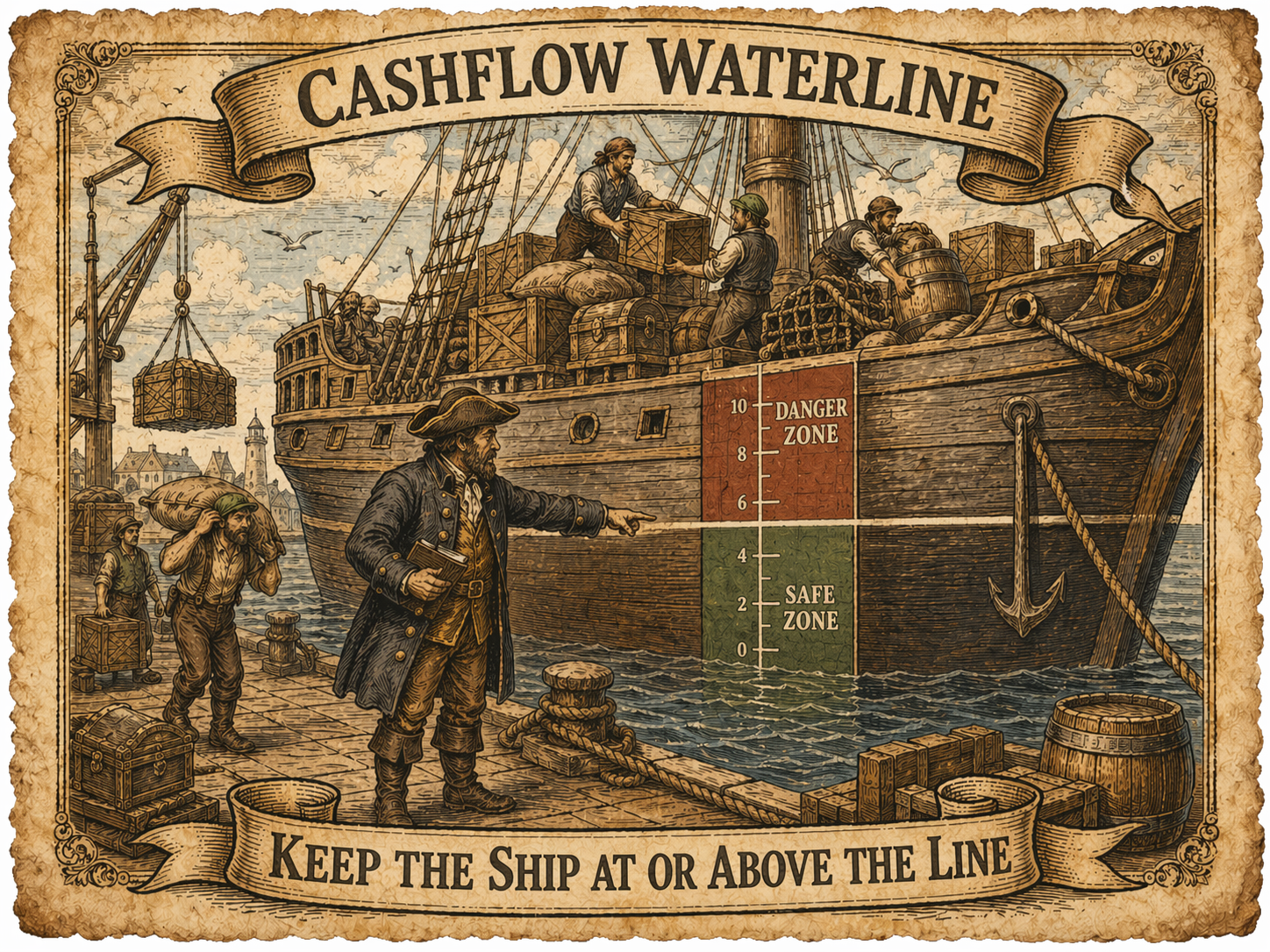
A ship doesn't need someone inspecting every crate every hour to know whether it's overloaded. It has a waterline. If the ship sits too low in the water, the load is too heavy.
Your Payment Hub can work the same way. You don't need to categorize every transaction all month just to know whether your spending is under control. You need to know whether the account stayed above its waterline after the month settled.
The balance can bob up and down during the month. Paychecks arrive. Credit card payments clear. Bills hit. Reimbursements come in. The account doesn't need to stay perfectly still. The test is whether it floats back to the Buffer Balance.
That's why "waterline" is the right image. The account is allowed to move. It shouldn't sink and stay sunk.
The waterline turns budgeting into a visible signal: above the line, the system is working; below the line, something needs correction.
The Payment Hub: the account where ordinary spending clears
 The Payment Hub is the account where ordinary spending clears.
It might be a checking account. It might be a cash-management account. It might be a brokerage account with bill-pay features. The specific account matters less than the role it plays.
The Payment Hub pays credit cards, bills, debit transactions if you use them, and routine expenses. It receives the money meant for normal life after retirement, long-term investing, and scheduled savings have already been carved out.
The Payment Hub isn't where your whole financial life lives. It's the account that keeps normal monthly spending moving.
This distinction matters. If you treat the Payment Hub as the place where all spare cash accumulates, then it stops being a clean signal. A big pile of cash can hide overspending for a while. A surprise bill can make a good month look bad. A scheduled expense can make ordinary spending look worse than it really was.
The Payment Hub works best when it has a narrow job. It's not your emergency fund. It's not your retirement account. It's not your long-term savings. It's the working account.
The Buffer Balance isn't an emergency fund
The Buffer Balance exists to prevent ordinary timing problems.
Payroll may arrive after a credit card payment clears. A bill may hit a day earlier than expected. Several debits may cluster together. A transfer may take longer than you thought. The buffer gives the Payment Hub enough working cash to make overdrafts unlikely under normal conditions and avoid constant micromanagement.
But the Buffer Balance isn't an emergency fund. It's not the Stormy Weather Fund. It's not extra savings. It's working money.
The Payment Hub should have enough money to do its job. It needs enough cash to handle normal timing problems, such as a credit card payment clearing a day before payroll arrives. That's what the buffer is for.
But the Payment Hub doesn't need to hold all of your spare cash. This is the account that pays bills, connects to credit cards, and sends money out into the world. If that account is ever compromised, a larger balance can create a larger problem. You may eventually get unauthorized transactions reversed, but "eventually" isn't the same as "no disruption."
So the goal isn't to keep the Payment Hub as full as possible. The goal is to keep it full enough to run smoothly, while keeping the rest of your cash in safer, less-exposed places.
The Buffer Balance is working money, not savings.
Protect the important money before the Payment Hub sees it
The system starts upstream.
Retirement savings, long-term investing, and major savings transfers shouldn't depend on whatever money happens to be left after ordinary spending. If important savings depend on leftovers, then daily life gets first claim on the money. That's backwards.
Payroll deductions can send money to a 401(k) or 403(b). Automatic transfers can send money to an IRA, taxable brokerage account, or savings account. Scheduled transfers can move money into funds for predictable and unpredictable lumpy costs.
What reaches the Payment Hub should be living-expense money, not every dollar earned.
This keeps the Payment Hub from becoming a temptation account. It also makes the one-number budget more honest, because the system is measuring ordinary spending after the important money has already been protected.
The Payment Hub should receive life money, not every dollar of your financial life.
The Smooth Sailing Fund: predictable lumpy costs
The Smooth Sailing Fund is for predictable but non-monthly expenses.
These might include car insurance, annual subscriptions, registrations, known renewals, annual fees, semiannual bills, and similar costs. These aren't emergencies. They're calendar events.
The setup is straightforward. List each scheduled expense in a spreadsheet. Add the yearly total. Divide that total by the number of paychecks you receive. Send that amount automatically into the Smooth Sailing Fund.
For example, suppose you have several predictable non-monthly expenses during the year: insurance payments, annual subscriptions, and registrations. You can add them up in one spreadsheet, divide by your number of paychecks, and turn the whole pile into one automatic per-paycheck transfer.
That way, the money for scheduled expenses is already being built before the bills arrive.
When possible, automate transfers from the Smooth Sailing Fund back into the Payment Hub shortly before each bill is due. If an insurance payment will hit the Payment Hub on the 15th, the Smooth Sailing Fund can send the money back on the 12th or 13th. Then the Payment Hub pays the bill without sinking below the waterline.
The annoying part is that not every bank or brokerage gives you flexible enough recurring-transfer options. Some platforms let you schedule annual or semiannual transfers. Some only offer weekly, biweekly, monthly, or quarterly transfers. If your platform cannot automate the exact transfer you need, use manual transfers, but don't rely on memory. Put reminders in at least two places.
Scheduled expenses aren't emergencies. They're promises you already know about.
The Stormy Weather Fund: unpredictable lumpy costs
The Stormy Weather Fund is for unpredictable lumpy costs.
These might include repairs, deductibles, surprise medical bills, emergency travel, broken appliances, and other inconvenient financial hits. They're not normal monthly spending, but they're also not scheduled promises. They're the stuff that happens because life occasionally hands you a problem with an invoice attached.
This isn't exactly the same thing as a full emergency fund. It's more like a shock absorber for ordinary financial ugliness. It may not always have enough to cover every possible hit, but it reduces how often surprise costs drag down the Payment Hub.
When one of these expenses hits, you can pay it through the normal system if needed, then manually reimburse the Payment Hub from the Stormy Weather Fund.
Suppose your car needs a repair and you pay with a credit card. When the credit card autopay clears through the Payment Hub, that repair would normally make the Payment Hub look worse. But if the repair is a Stormy Weather expense, you transfer money from the Stormy Weather Fund back into the Payment Hub. That keeps the account balance from falsely suggesting that your normal monthly spending went out of control.
The Stormy Weather Fund keeps irregular costs from pretending to be normal monthly spending.
Why two funds, not ten?
The Smooth Sailing Fund and the Stormy Weather Fund do different jobs.
The Smooth Sailing Fund holds money for known future bills. The Stormy Weather Fund handles uncertain hits. If you mix them, a repair could drain money that was supposed to cover an insurance payment. Then the insurance payment hits the Payment Hub, the balance drops below the waterline, and the budget signal gets polluted.
So two funds may be worth it because they separate known promises from messy surprises. But that doesn't mean every purpose needs its own account.
If your bank makes it easy to create multiple savings accounts, you may be tempted to create one for every purpose: car repairs, insurance, holidays, travel, medical expenses, gifts, and so on. That can be useful for some people, but it can also turn the system back into category tracking.
The better default is simple:
The account holds the money. The spreadsheet holds the explanation.
The Smooth Sailing Fund can hold one pile of money, while the spreadsheet explains how much of that pile is being set aside for each scheduled obligation. You don't necessarily need a separate bank account for every future bill.
The same principle applies to the Stormy Weather Fund. It can simply be the account for unpredictable lumpy costs. You don't need one account for tires, one for appliances, one for deductibles, and one for surprise travel unless those extra accounts solve a real problem.
For most people, one Smooth Sailing Fund and one Stormy Weather Fund are enough. Add another account only when the extra complexity clearly pays for itself.
Use enough separation to prevent real failures. Don't add separation just to feel organized.
Add complexity only when the complexity pays rent.
The monthly check: above the waterline or below it
At the end of the month, look at the Payment Hub balance.
If it's at or above the Buffer Balance, the system worked.
You don't need to categorize every transaction to prove that the month was okay. You don't need to split every receipt. You don't need to build a report showing exactly how much went to restaurants, groceries, household goods, clothes, gas, entertainment, and subscriptions.
The Payment Hub stayed above the waterline. That's the signal.
If the Payment Hub is below the Buffer Balance, first ask whether a lumpy expense hasn't been reimbursed yet. Did a scheduled insurance payment hit the account? Did a car registration payment clear? Did a repair get paid through a credit card, but the Stormy Weather Fund hasn't reimbursed the Payment Hub yet?
If yes, reimburse the Payment Hub from the right fund.
If the account is still below the Buffer Balance after reimbursements, either normal spending was too high or money that should have arrived didn't arrive. Find the cause, then restore the buffer.
This should feel mechanical, not moral. The point isn't to feel guilty about being below the line. The point is to make the correction obvious.
When the Payment Hub sinks below the waterline, restoring the buffer becomes the next spending priority.
A small example month
Suppose your Buffer Balance is \$1,500.
At the end of the month, the Payment Hub balance is \$1,620. You're fine. The system worked. You don't need to categorize every transaction to prove that the month was okay.
Now suppose the Payment Hub balance is \$1,300. You are \$200 below the waterline.
Before you decide that normal spending was too high, check whether a reimbursable lumpy expense hit the account. If a \$200 car registration payment cleared and the Smooth Sailing Fund hasn't reimbursed it yet, transfer the \$200 from the Smooth Sailing Fund back into the Payment Hub. Now the Payment Hub is back to \$1,500, and the system is fine.
But if there's no missing reimbursement, then the account is really \$200 below the waterline. Next month, the first job is to spend \$200 less, receive \$200 more, or otherwise restore the buffer.
The point isn't to punish yourself for being below the line. The point is to make the correction obvious.
Use AI for diagnosis
The obvious objection is: if you don't track categories, how do you know where to cut?
The answer is that you don't need that information all the time. You need it when the waterline tells you there's a problem.
If the Payment Hub keeps falling below the Buffer Balance, then investigate. Download credit card transaction reports, preferably as CSV files. If you use a three-card system, this may mean downloading only three statements. If you also use a few merchant-specific cards, maybe it means four or five. That's still much easier than maintaining a permanent category budget every week of your life.
Then use an AI tool like a temporary bookkeeper.
Ask it to categorize spending, identify repeated merchants, find flexible spending areas, and suggest specific cuts. Ask it to look for patterns: restaurants, delivery, subscriptions, Amazon, convenience purchases, gas station snacks, duplicate services, or any other repeated spending that may be easier to reduce than it was to notice.
This turns category analysis into occasional troubleshooting, not permanent homework.
The privacy caveat matters. Before uploading statements or CSV files, remove account numbers, addresses, phone numbers, and anything else you don't want included. If the export includes unnecessary identifying information, delete those columns first. The AI doesn't need your account number to notice that restaurant spending jumped or that three subscriptions are quietly renewing.
This is budgeting, not bookkeeping
Cashflow Waterline is still budgeting.
It controls spending. It protects savings. It separates predictable future costs from ordinary monthly spending. It gives you a rule for what to do when spending gets too high.
What it avoids is permanent bookkeeping.
Category budgeting tries to control spending by classifying everything. Cashflow Waterline controls spending by watching the result that matters: whether the Payment Hub stays above its working balance.
That reduces decision fatigue. It reduces clerical work. It avoids the false precision of pretending every household purchase fits neatly into one category. It still allows deeper diagnosis when diagnosis becomes useful.
This isn't anti-budgeting. It's anti-bookkeeping.
You don't need to know whether every dollar went to the "right" category. You need to know whether your normal life stayed inside the amount your life can safely support.
A budget doesn't have to be a bureaucracy
You're not trying to run your household like a government department or a large business with accounting staff. You're trying to keep your financial ship from sitting too low in the water.
The Cashflow Waterline gives you one number to watch. If the Payment Hub floats at or above that number, the system is working. If it sinks below that number, you correct course.
That's enough for many households most of the time.
You can still use spreadsheets where they help. You can still use accounts where they do real work. You can still use AI or spending reports when something needs diagnosis. But you don't have to turn every grocery run, restaurant meal, pharmacy stop, and Walmart receipt into a classification problem.
A budget can be simpler than that. A budget can be a waterline.
How I got here in the first place
Early on, I did what a lot of people do. I took the standard budgeting advice seriously. I made categories based on what I was buying. I tried to set limits for each category. I tracked overages, moved money around, and tried to keep the whole thing updated.
Then the work started piling up.
A Walmart receipt wasn't just a Walmart receipt. Part of it was groceries. Part of it was household goods. Part of it might be school supplies. Part of it might be clothing. If I wanted the category budget to be accurate, I couldn't just enter the total. I had to break the receipt apart.
That kind of work is sustainable if you have an accountant on staff. It's not sustainable if you're a normal person trying to run your life.
Eventually, the system stopped being maintained. Not because budgeting was useless, but because that version of budgeting demanded too much labor.
For a long time, I mostly used my account balance as the signal. If the balance was going up, I was doing fine. If it stayed about the same, I was still okay. If it started going down, I knew I needed to spend less.
The Cashflow Waterline system keeps that basic insight but adds better guardrails: a defined buffer, a Smooth Sailing Fund, and a Stormy Weather Fund.
The useful idea from traditional budgeting is that future costs need money set aside. The bad idea is that ordinary life has to be tracked like a business ledger.